IrisBG
Coffee Chats
Ask IrisBG, an interactive Q&A
IrisBG
“What makes us human, I think, is an ability to ask questions, a consequence of our sophisticated spoken language.” - Jane Goodall
This month, the IrisBG Team took questions from our user community in a live session. The great part about the IrisBG Community is that you answered each other’s questions, and asked the questions that someone else didn’t know they needed to know.
We are always available to answer questions! Just send us an email at support@irisbg.zendesk.com.
Q&A
Q: What is the best method for recording invasive species?
A: There are several options for recording invasive species:
Option 1 Taxa Screen > Details Tab (opens in a new tab)> Blacklist. This field with default risks assigned which can be edited
Option 2 Observation Module (opens in a new tab) > Edit Code list for the Observation Types for invasive plants
Option 3 Custom Attributes at the Taxa level (opens in a new tab)
Option 4 Public Gardens as Sentinels Against Invasive Plants - PGSIP Add-On (opens in a new tab)
Q: Is there still a plan to make IrisBG into an online version?
A: Yes. Stay tuned for more details on a browser based version of IrisBG.
Q: Can historical comments be searchable and pulled into Item reports?
A: Yes. For a search start with the Accessions Screen, Use the Advanced Search (opens in a new tab) > check search in item history
For a report start with the Reports Screen (opens in a new tab)>Accession Items>ItemHist01: Item History.
💡 Tip! You can select a list of accession items that are saved to an Event or a Project if historical comments from a list of items are needed.
Q: Item Comments feature request: could the item comments be appended to rather than replaced?
A: In the next release of IrisBG you will be able to use “>+”, e.g. “>+My new comment” to append to an existing comment. Fields that will be affected are ItemComment, ItemStatusComment, ItemLocationComment and ItemPropagationComment.
Q: Is there a way to prevent a blank map when looking at maps?
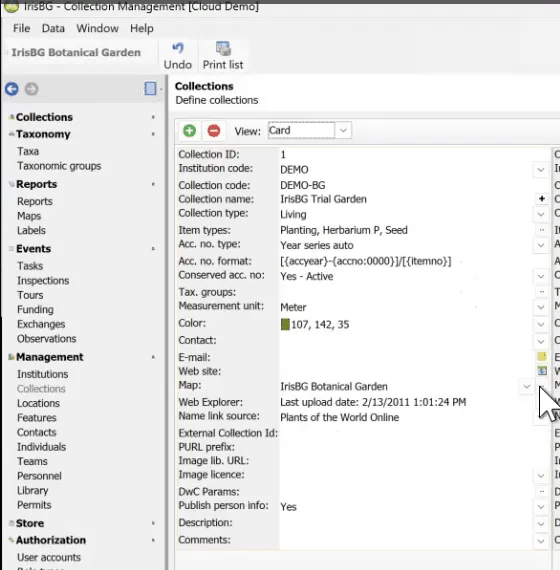
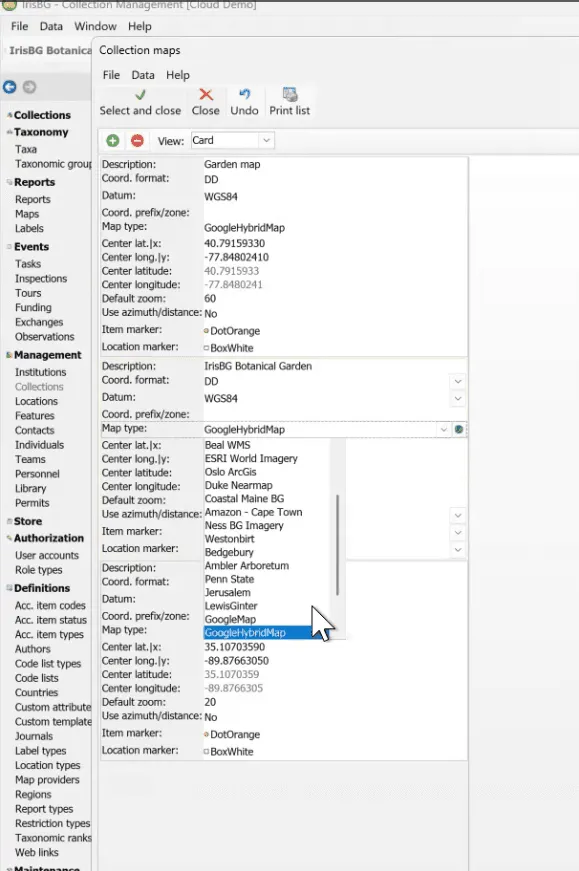
A: Yes. In the Collections Screen, view the Collections Card. Next, click on the ellipsis button  for the Map menu. This will open the Collection Maps screen.
You can change the map type from the drop down in this screen.
Q: What is the easiest way to give feature requests to the IrisBG team?
A: Please send us an email at support@irisbg.zendesk.com
Q: We would like to have improved task functionality with the IrisBG-ArcGIS Mobile.
A: There are a couple of ways to accomplish this with AGOL apps, please see this article: IrisBG-ArcGIS Mobile | Monitoring IrisBG Tasks in AGOL a Review and Video Tutorials (opens in a new tab)
Q: How are item types used for different purposes?
A: The Dawes Arboretum has types for their bonsai collection and in-situ items. The advantage is that then there can be different code lists for these types. Bonsai use different pots and in-situ plants can have different item statuses. See our article on Adding Accession Item Types (opens in a new tab).
Q: We noticed that the accession numbers can skip if an accession is started and then cancelled. How do we keep the sequential numbering from skipping?
A: You can check with a search by year to verify the number of accessions and the accession number listed next to see if this is happening.
For performance, IrisBG uses a cache that holds the next accession number. Using this, we avoid scanning the entire accession database table for the next number. The cache is used and updated when trying to save an accession.
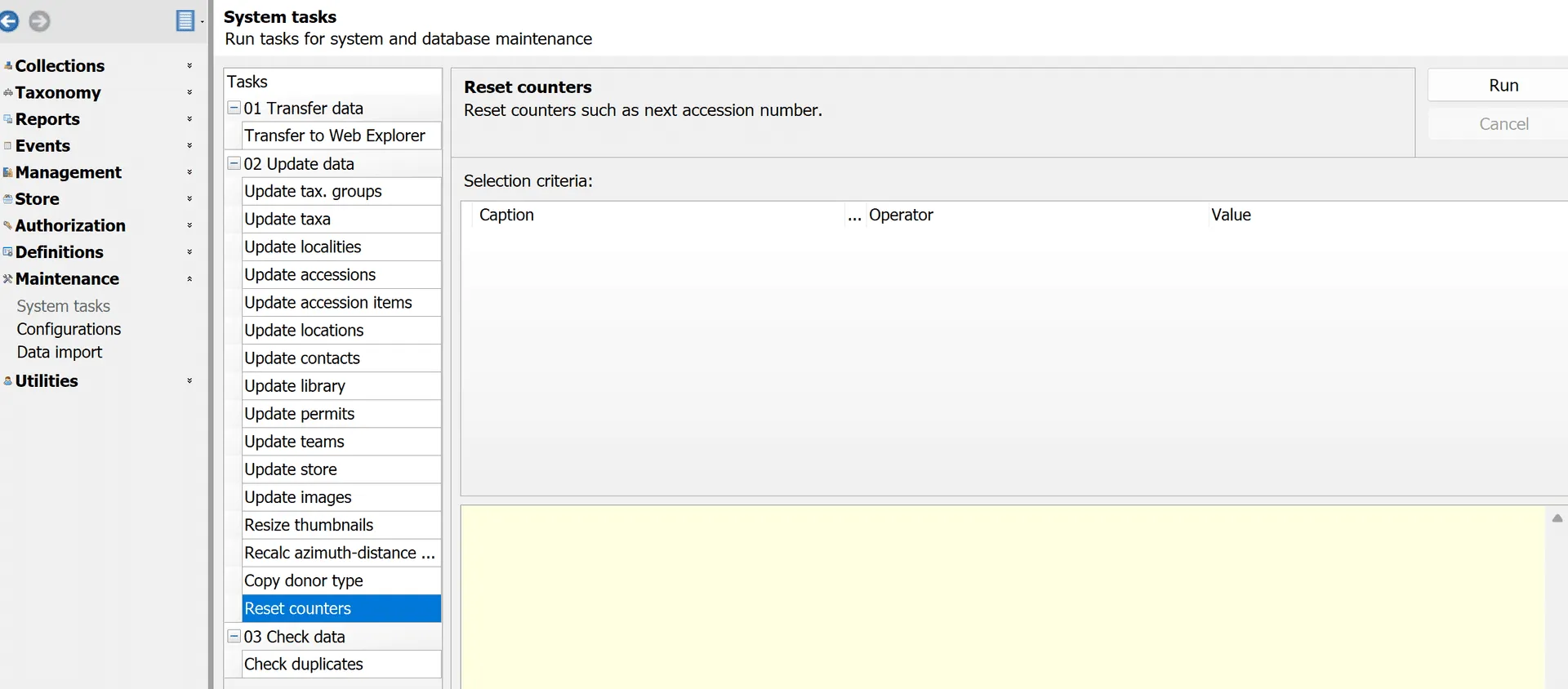
The cache can be cleared by running Maintenance > System tasks: Reset counters. A database accession scan will then be used to find the next accession number and the cache will be updated.